
Model Context Protocol (MCP) is an open standard from Anthropic that lets AI agents discover and use tools without custom API integration code. Instead of writing fetch calls and parsing JSON, you install an MCP server and the agent can immediately use its capabilities.
Kettio ships an MCP server that gives Claude (and any MCP-compatible agent) instant access to creative scoring, image generation, AI editing, and asset management. This guide walks through setting it up and building autonomous marketing workflows.
What Is MCP?
MCP (Model Context Protocol) is to AI agents what USB is to hardware. Before USB, every device needed a custom cable and driver. Before MCP, every tool an agent used needed custom integration code — API wrappers, authentication handling, response parsing, error handling.
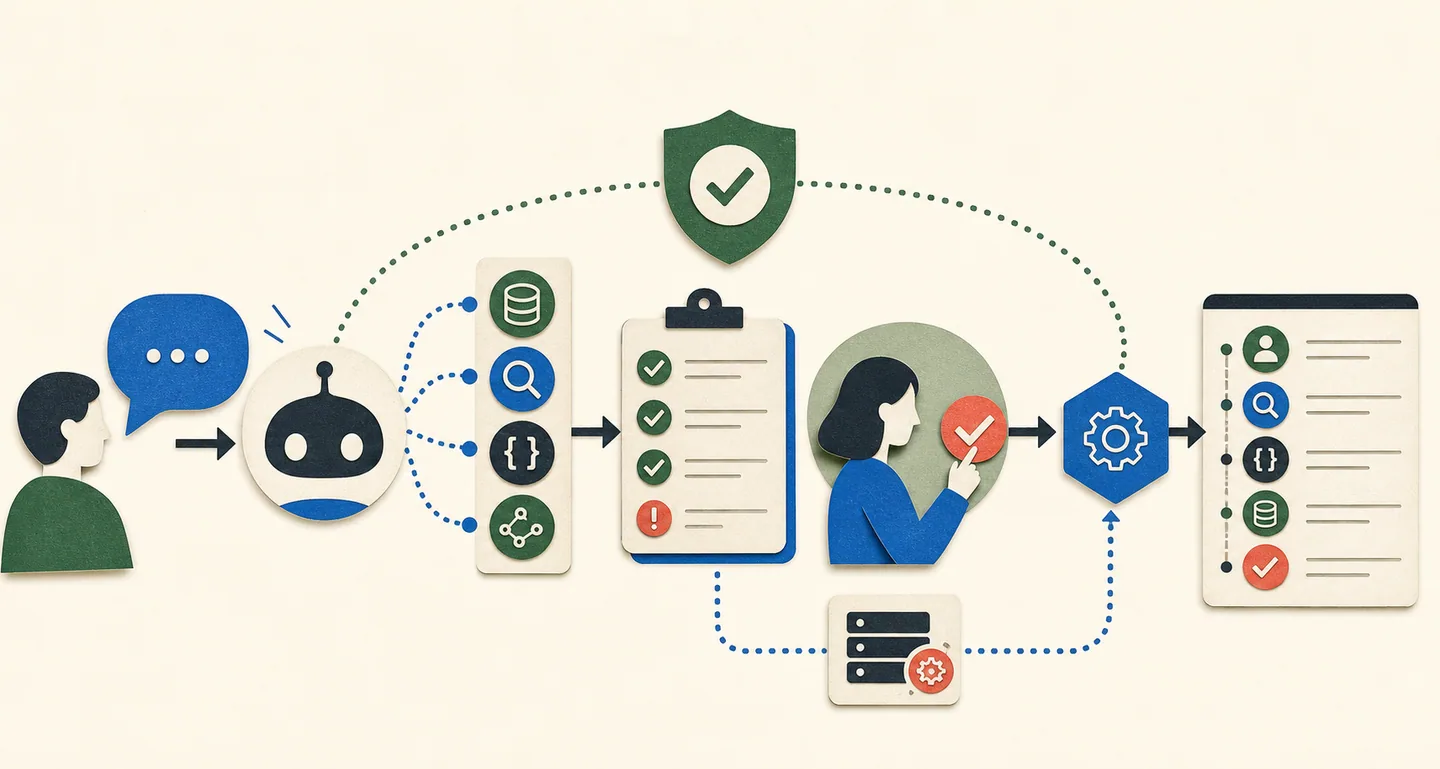
MCP standardizes this. An MCP server exposes tools with typed schemas. An MCP client (like Claude Desktop) discovers these tools and can use them in conversation. The agent sees the tool descriptions, understands what they do, and calls them when appropriate.
For marketing agents, this means you can give Claude access to your entire creative testing pipeline by installing a single package.
Setting Up Kettio MCP
Prerequisites
- Claude Desktop (macOS or Windows)
- Node.js 18+
- A Kettio API key (get one at kettio.com/login)
Step 1: Install the MCP Server
Open your Claude Desktop configuration file:
- macOS:
~/Library/Application Support/Claude/claude_desktop_config.json - Windows:
%APPDATA%Claudeclaude_desktop_config.json
Add the Kettio MCP server:
{
  "mcpServers": {
    "kettio": {
      "command": "npx",
      "args": ["-y", "@kettio/mcp-server"],
      "env": {
        "KETTIO_API_KEY": "agk_live_YOUR_KEY"
      }
    }
  }
}
Step 2: Restart Claude Desktop
After saving the config, restart Claude Desktop. You should see the Kettio tools appear in Claude's tool list (the hammer icon).
Step 3: Verify the Connection
Ask Claude: "What Kettio tools do you have access to?"
Claude should list the available tools, which include:
| Tool | Description |
|---|---|
rank_assets |
Score and rank 1–20 local ad creatives against a simulated audience |
rank_ad_batch |
Queue an asynchronous ranking run for larger batches |
get_rank_run |
Poll an asynchronous run and collect the finished ranking |
list_audiences |
List saved audiences on your account with their IDs |

Example Workflows
Workflow 1: Generate and Score Ads
Talk to Claude like you would a creative team member:
"Generate 3 Instagram ad variants for a sustainable sneaker brand targeting Gen Z. Use bold colors and minimal text. Then score them for scroll-stopping appeal with an audience of 18-24 year olds who have high ad skepticism."
Claude will:
- Call
generate_assetswith a prompt based on your description - Wait for generation to complete (polls
/api/mcp/jobs/:id) - Score each generated image against your specified audience
- Report which variant scored highest and why
Workflow 2: Competitive Analysis
"I uploaded 5 competitor ads to my Kettio dashboard. List my assets, then score all of them for purchase intent targeting budget-conscious parents aged 35-44. Tell me what the top performer does differently."
Claude will:
- Call
list_assetsto find your uploaded ads - Score each one with the specified audience and goal
- Analyze the rationales to identify what makes the winner work
- Suggest how to apply those insights to your own creative
Workflow 3: Iterative Improvement
"My current hero ad scored 2.8. The rationale says the text is too small and the value prop isn't clear. Edit the image to make the headline 30% larger and add a clear price callout. Then re-score it."
Claude will:
- Call
edit_assetswith your improvement instructions - Re-score the edited version against the same audience
- Compare the before/after scores and explain what changed
Building Custom Agents with the REST API
MCP is great for interactive workflows with Claude Desktop. For programmatic agents (cron jobs, CI pipelines, custom agent frameworks), use the REST API directly.
The Generate → Score → Iterate Loop
async function generateAndOptimize(apiKey, prompt, audience, goal, iterations = 3) {
  let bestScore = 0;
  let bestAssetUrl = null;

  for (let i = 0; i < iterations; i++) {
    console.log(`
--- Iteration ${i + 1} ---`);

    // Generate new creative
    const genRes = await fetch('https://kettio.com/api/mcp/generate', {
      method: 'POST',
      headers: {
        'Authorization': `Bearer ${apiKey}`,
        'Content-Type': 'application/json'
      },
      body: JSON.stringify({
        prompt: i === 0
          ? prompt
          : `${prompt}. Improve on the previous version: make the value proposition clearer and the visual hierarchy stronger.`,
        count: 3,
        model: 'nano-banana-pro'
      })
    });
    const { jobId } = await genRes.json();

    // Poll until complete
    let assets = [];
    while (true) {
      const statusRes = await fetch(`https://kettio.com/api/mcp/jobs/${jobId}`, {
        headers: { 'Authorization': `Bearer ${apiKey}` }
      });
      const status = await statusRes.json();

      if (status.status === 'completed') {
        assets = status.assets;
        break;
      }
      if (status.status === 'failed') throw new Error('Generation failed');
      await new Promise(r => setTimeout(r, 5000));
    }

    // Score all generated variants
    const rankRes = await fetch('https://kettio.com/api/v1/rank', {
      method: 'POST',
      headers: {
        'Authorization': `Bearer ${apiKey}`,
        'Content-Type': 'application/json'
      },
      body: JSON.stringify({
        assets: assets.map((a, idx) => ({
          url: a.downloadUrl,
          id: `iter${i}-var${idx}`
        })),
        audience,
        goal
      })
    });
    const { ranked } = await rankRes.json();

    const topVariant = ranked[0];
    console.log(`Best this round: ${topVariant.score.toFixed(2)} (${topVariant.asset_id})`);

    if (topVariant.score > bestScore) {
      bestScore = topVariant.score;
      bestAssetUrl = topVariant.asset_url;
      console.log(`New overall best: ${bestScore.toFixed(2)}`);
    }

    // If we've hit a good enough score, stop early
    if (bestScore >= 4.0) {
      console.log('Score threshold reached. Stopping.');
      break;
    }
  }

  return { bestScore, bestAssetUrl };
}
MCP vs. REST API: Choosing the Right Approach
| Use Case | MCP (Claude Desktop) | REST API |
|---|---|---|
| Interactive exploration | Best | OK |
| One-off creative review | Best | OK |
| Automated pipelines | N/A | Best |
| CI/CD integration | N/A | Best |
| Custom agent frameworks | N/A | Best |
| Client-facing demos | Best | OK |
Agent Framework Integration
If you're building agents with frameworks like LangChain, CrewAI, or the Anthropic Agent SDK, Kettio endpoints work as standard tool definitions:
# Example: LangChain tool definition
from langchain.tools import tool
import requests

@tool
def score_creatives(
    image_urls: list[str],
    audience_name: str,
    audience_demographics: dict,
    goal: str = "purchase-intent"
) -> dict:
    """Score ad creatives against a target audience.
    Returns ranked results with scores, rationales, and confidence levels."""
    response = requests.post(
        "https://kettio.com/api/v1/rank",
        headers={
            "Authorization": f"Bearer {KETTIO_API_KEY}",
            "Content-Type": "application/json"
        },
        json={
            "assets": [{"url": url, "id": f"ad-{i}"} for i, url in enumerate(image_urls)],
            "audience": {
                "name": audience_name,
                "demographics": audience_demographics
            },
            "goal": goal
        }
    )
    return response.json()
# Example: Anthropic Agent SDK tool
from anthropic import Anthropic

client = Anthropic()

tools = [{
    "name": "rank_creatives",
    "description": "Score and rank ad creatives against a target audience using Kettio's SSR pipeline. Returns ranked results with scores (1-5), natural language rationales, and confidence levels.",
    "input_schema": {
        "type": "object",
        "properties": {
            "assets": {
                "type": "array",
                "items": {
                    "type": "object",
                    "properties": {
                        "url": {"type": "string"},
                        "id": {"type": "string"}
                    },
                    "required": ["url"]
                },
                "description": "1-20 image URLs to score"
            },
            "audience": {
                "type": "object",
                "properties": {
                    "name": {"type": "string"},
                    "demographics": {"type": "object"}
                },
                "required": ["name"]
            },
            "goal": {
                "type": "string",
                "enum": ["purchase-intent", "click-through-rate", "scroll-stopping",
                         "engagement", "trustworthiness", "conversion-potential"],
                "default": "purchase-intent"
            }
        },
        "required": ["assets", "audience"]
    }
}]
Security Best Practices
- Never expose your API key in client-side code. Use environment variables or a server-side proxy.
- Use scoped keys when possible. MCP keys have scopes like
assets.read,assets.generate, andassets.edit. Create keys with only the scopes your agent needs. - Monitor credit usage. Set up alerts for unusual consumption patterns. An agent bug that loops can burn through credits quickly.
- Rate limit your agent. Even though Kettio enforces rate limits (60 scoring evaluations/min for ranking, 10 images/min for generation), add your own limits to prevent runaway loops.
Build Your Marketing Agent
Get your API key, install the MCP server, and start building autonomous marketing workflows in minutes.
Get Started Free →Frequently Asked Questions
What is MCP (Model Context Protocol)?
MCP is an open standard from Anthropic that lets AI agents discover and use tools through a standardized interface. Instead of writing custom API integration code, you install an MCP server and the agent can immediately use its tools. Think of it as USB for AI tools.
Do I need Claude Desktop to use Kettio with agents?
No. The MCP server is a convenience for Claude Desktop users. You can use Kettio's REST API directly with any agent framework — LangChain, CrewAI, AutoGPT, custom agents, or plain HTTP requests.
Can I use Kettio MCP with other LLMs?
MCP is currently best supported in Claude Desktop. However, MCP is an open standard and other clients are emerging. You can also use the REST API directly with any LLM that supports tool use.
How much does it cost to run an AI marketing agent with Kettio?
Kettio charges per successful scoring evaluation. Image-only assets usually use 1 credit; assets with copy context can use 2 because Kettio also runs an image-only ablation. A typical image-only workflow that scores 10 creatives against 3 audience segments uses 30 credits. Image generation costs vary by model. All accounts start with 50 free credits.
Can agents publish ads directly through Kettio?
Kettio integrates with Meta, Pinterest, and TikTok for ad publishing. Currently these integrations require an authenticated web session (OAuth). API-driven publishing is on the roadmap.
Try it on your ads
Compare your own ads, free.
Upload two static ads, choose your buyer, and get a quick prediction with clear next steps. No signup or credit card.
Find my winning ad →