
The AI ad creative workflow has three stages: generate, test, launch. Most teams do stage one and stage three. They skip stage two, testing, and replace it with gut feel or, worse, with in-platform A/B testing that burns budget finding out what pre-launch testing could have told them for free.
This is the canonical workflow. Every tool recommendation is based on what actually works in production, not what has the best marketing. The goal is a system you can run repeatedly, at scale, without it becoming a full-time job.
Stage 1: Generate
Every format now has a purpose-built AI generator. The choice isn’t whether to use them, it’s which one fits each part of your stack.
For ad copy (headlines, body, CTAs):
- Claude or ChatGPT for flexible, high-quality copy generation. These work best when you give them a clear brief: product, target audience, platform, desired emotional response, character limits. Don’t ask for “good ad copy.” Ask for “5 Facebook headline variants for a $79 supplement targeting 40-55 year old men with joint pain, max 40 characters, lead with the problem.”
- Copy.ai or Jasper for teams that want templates and guardrails. These tools have platform-specific formats baked in and are faster for teams that don’t want to manage prompts.
For visuals (static images, product photography, lifestyle):
- Adobe Firefly for brand-safe, commercially licensed image generation. Use it for background concepts, lifestyle imagery, and variations on existing product photos.
- Leonardo.ai for ecommerce product placement and high-volume concept generation. The free tier (150 tokens/day) is usable for sustained production work.
- Canva AI (Magic Studio) if your team already works in Canva. Generating variants within existing templates dramatically reduces finishing time.
For video:
- Runway Gen-3 for concept-level video clips. Good for testing whether a motion version of your static creative warrants full production investment.
- Pika for animating static product images. Fast, free tier available, useful for social video concept testing.
- InVideo AI for full video ad assembly from scripts. Watermarked on free tier but usable for internal review and concept approval.
For a full breakdown of the free tool landscape, read the best AI ad tools in 2026.
Generation target: 8–15 variants per campaign. Fewer than 8 and you’re not giving the testing stage enough to work with. More than 15 and you’re generating noise. The optimal range gives testing enough signal to find clear winners while keeping generation time manageable.
Stage 2: Test
Two weeks of A/B testing to learn what 30 minutes of pre-launch testing can tell you. That’s the cost of skipping this stage.
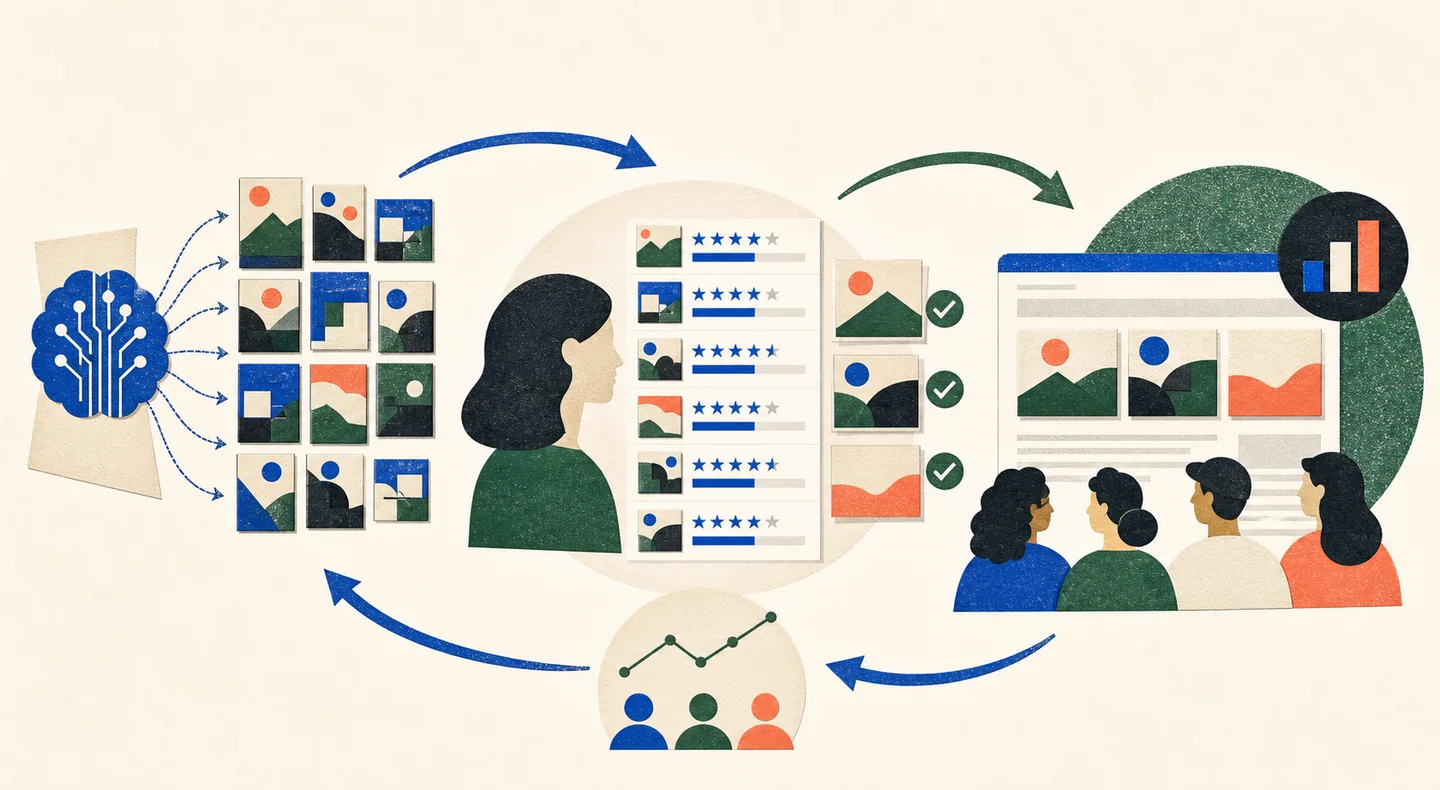
Testing happens before any media spend. You upload your generated variants, define your target audience, and get a predicted performance ranking. The variants that rank at the bottom get cut. The variants that rank at the top go to launch.
How to run pre-launch testing on Kettio:
- Upload your variants. Drag and drop your image files, video thumbnails, or creative exports. Supported formats include JPEG, PNG, and MP4 stills. You can upload 2–20 variants per test.
- Define your audience. This step matters more than most teams realize. Vague audience definition (“18-35 year olds”) produces vague predictions. Specific audience definition (“women 28-40, interested in clean beauty, primary platform Instagram, considering switching from their current skincare brand”) produces actionable predictions. Take five minutes here. It changes the output quality significantly.
- Select your goal. Are you optimizing for click-through rate, purchase intent, or brand recall? Different goals produce different scores. A creative that’s great for brand awareness may rank differently than one optimized for immediate conversion. Select the goal that matches your campaign objective.
- Review the ranked output. You get a sorted list of variants with predicted performance scores. Each variant also has a qualitative explanation: what specific elements drove the score up or down, what the synthetic audience responded to, what fell flat.
- Cut the bottom half. Be ruthless. If your score spread is meaningful (and it usually is, with top variants typically outscoring bottom variants by 15–30%), the bottom-ranked creatives aren’t close calls. They’re losers. Cut them before they touch your budget.
The full process takes 15–30 minutes for a batch of 10–12 variants. That’s the time investment that replaces a 2–4 week A/B test cycle.
For context on why the testing methodology works, see the AI ad creative guide and how to test AI-generated creatives.
Stage 3: Launch
You’re launching winners, not a mix of winners and unknowns. This changes how you approach campaign setup.
Platform-specific launch recommendations:
Meta (Facebook/Instagram): Take your top 3–5 ranked variants. Launch them in a Campaign Budget Optimization (CBO) setup. Let Meta allocate budget dynamically across creatives. You’re giving it good inputs to work with, so its optimization will converge faster. Monitor for the first 3–5 days and kill anything that’s clearly underdelivering after 500+ impressions.
TikTok: TikTok’s algorithm is more sensitive to early engagement signals than Meta’s. Launch your top 2–3 ranked variants with equal budget initially. Don’t let TikTok’s smart campaign feature consolidate too early. Give each variant at least 48 hours before making cuts.
Google (Performance Max or Display): Upload your top-ranked variants as assets. PMax will test them against each other within the campaign. Your pre-testing ranking should align with Google’s asset strength scores within 7–10 days. Use that as a validation signal.
LinkedIn: Launch top 2 variants. LinkedIn’s CPMs are high enough that you especially don’t want to pay learning phase costs on losers.
The Feedback Loop: Turning Launch Data into Better Generation
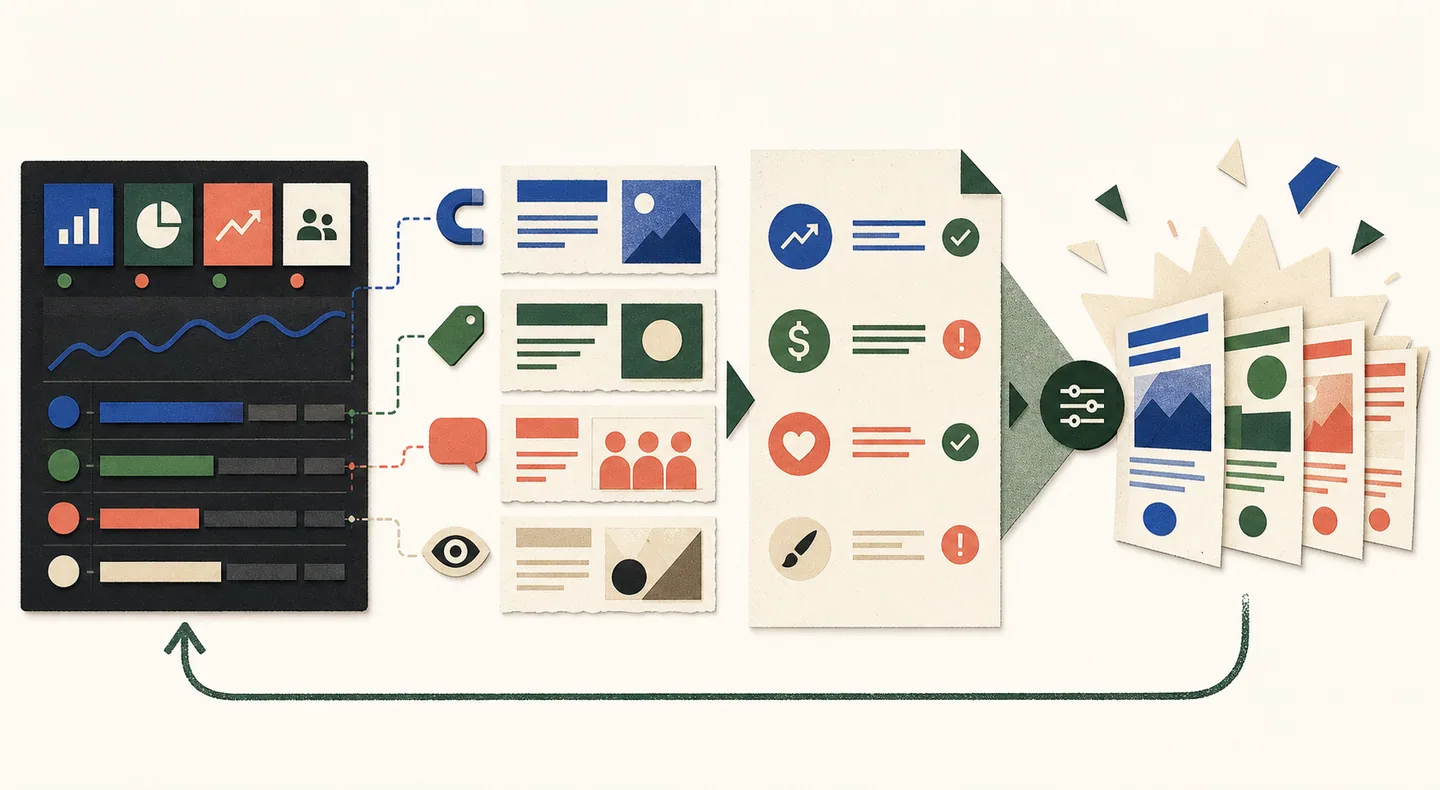
The workflow doesn’t end at launch. Real performance data from Stage 3 feeds back into Stage 1 and 2.
After 2–4 weeks of live campaign data:
- Compare synthetic scores to real performance. Which variants did Kettio rank highest? Did they actually outperform in-platform? Synthetic rankings and live CTR rankings should trend in the same direction. Gaps are worth investigating: they tell you where your audience model needs refinement.
- Use explanations to brief generation. Kettio’s explanations for why each variant scored as it did are your creative brief for the next round. If the winning variant’s explanation says “the headline directly addresses the primary fear of your target audience,” your next generation prompt should emphasize fear-addressing copy.
- Refine audience definition. If there’s consistent divergence between synthetic and real rankings, your audience definition may be too broad or misspecified. Tighten it using the demographic data from your campaign analytics.
Teams that close this loop get faster. Each generation round starts from better creative intuition. Each testing round has a more calibrated audience model. Each launch cycle burns less budget on losers. Over six months, the gap between teams running this workflow and teams winging it is substantial.
How This Compares to the Old Stack
The old stack: design team produces 3–5 variants based on gut feel, launch all of them, wait 2–4 weeks for A/B test data, cut the losers, brief the next round based on winner analysis. Total cycle time: 4–6 weeks. Total budget burned on losers: 40–60% of test spend.
The new stack: AI generation produces 10–15 variants in hours, synthetic testing eliminates the bottom half in 30 minutes, top 3–5 variants launch with confidence, real data validates and informs next round. Total cycle time: 1–2 weeks (mostly the platform learning phase for confirmation). Budget burned on losers: minimal, because losers don’t make it to launch.
For teams comparing this approach to the tools they already use, the comparison with AdCreative.ai is worth reading. It covers where generation-only tools fall short and why testing is the missing piece.
The old stack burns 40–60% of test spend on creatives that lose. The new stack burns almost none. That delta, over a year of campaigns, is where the real ROI of this workflow lives. See how Kettio fits into the testing stage.
Try it on your ads
Compare your own ads, free.
Upload two static ads, choose your buyer, and get a quick prediction with clear next steps. No signup or credit card.
Find my winning ad →